
Last checked: 18 October 2026 · Member Portal home page checked live; based on EPFO’s published rules
Quick answer: Money in an old PF account is never forfeited and there is no deadline to claim it. Activate your UAN (EPFO now routes this through the UMANG app), link Aadhaar, PAN and bank, then either transfer the old balance to your current PF account (if you are working) or withdraw it with Form 19 and Form 10C (if you are not).
Is your old PF still earning interest?
EPFO has clarified that leaving a job does not immediately stop interest:
- If you left employment before age 55, the balance keeps earning interest until you turn 58.
- If you retired at 55 or later, the account becomes inoperative 3 years after retirement and stops earning interest then.
- Accounts also become inoperative 36 months after permanent migration abroad, or after the member’s death if no one claims.
Once an account is inoperative it earns no further interest, but the money stays yours. EPFO reported about 30.9 lakh inoperative accounts holding about ₹9,330 crore as of 31 March 2026.
Who this guide is for
- People who changed jobs and left PF behind with an old employer
- Retired members who never withdrew their PF
- Family members of a member who has died. See the section for families below.
Before you start: keep these ready
- Your UAN (Universal Account Number), if you have one. It is on your salary slip or can be found using “Know your UAN” on the member portal
- Aadhaar linked to the mobile number you can receive OTP on
- PAN and an active bank account in your name with IFSC
- Old employer’s name, PF account or member ID number, and dates of joining and leaving, if you have them
Step-by-step: find and claim your old PF
Step 1: Activate your UAN
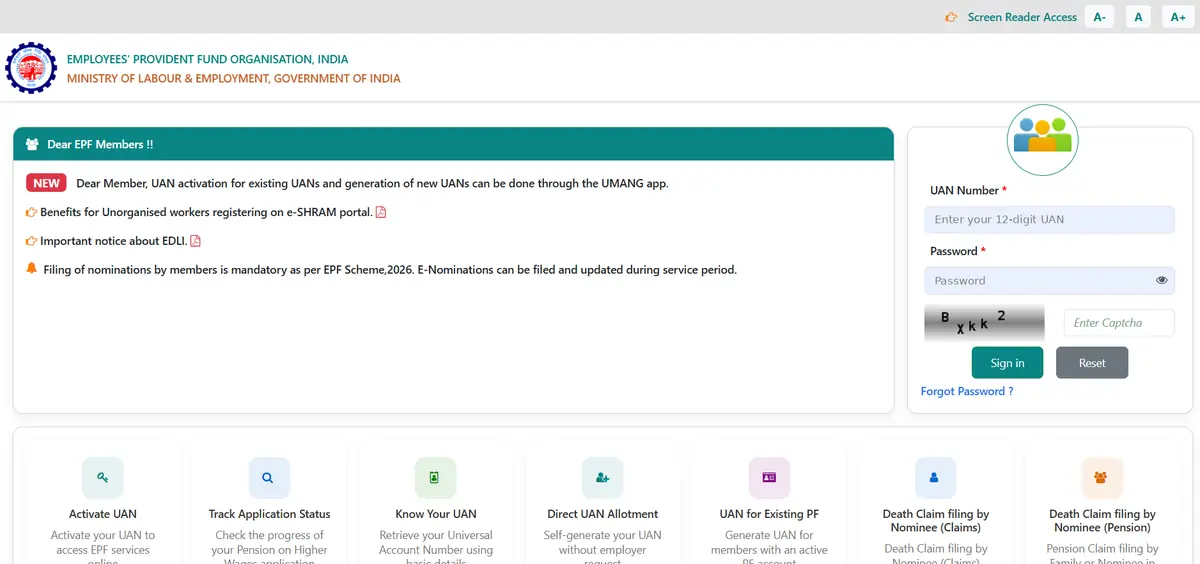
- Use the UMANG app. EPFO now says UAN activation for existing UANs, and generation of new UANs, can be done through the UMANG app. In UMANG, open the EPFO services and choose UAN activation. Keep your Aadhaar and Aadhaar-linked mobile handy.
- Don’t know your UAN? The EPFO Member Portal has a “Know Your UAN” option. Never had one? Use “Direct UAN Allotment” or “UAN for Existing PF” on the same page.
- Log in to the Member Portal with your UAN, password and captcha, and complete KYC under Manage → KYC: Aadhaar, PAN and bank account.
Step 2: Check which accounts appear under your UAN
Open View → Service History or the passbook. Each employer usually has a separate member ID. If an old employer is missing, see Step 4.
Step 3a: Still working? Transfer the old balance
- Go to Online Services → One Member – One EPF Account (Transfer Request).
- Select the old member ID and submit with OTP.
- Track it under Online Services → Track Claim Status.
Transferring keeps your money earning interest and keeps your service continuous, which matters for tax-free withdrawal and pension.
Step 3b: Not working or retired? Withdraw
- Go to Online Services → Claim (Form-31, 19, 10C & 10D).
- Verify your bank account.
- Choose Form 19 for the PF balance and Form 10C for the pension (EPS) part, as applicable, and submit with Aadhaar OTP.
- Track the claim status online.
Step 4: Old account not linked to your UAN (often pre-2014)
UANs were introduced in 2014, so older accounts may not appear. Options:
- E-PRAAPTI: EPFO’s Aadhaar-based portal for tracing and linking old, inoperative accounts is being rolled out in phases. The first phase needs your old member ID. Check epfindia.gov.in for the current link.
- Inoperative account helpdesk: on the EPFO website, give your old employer’s details and EPFO tries to trace the account.
- Visit the EPFO office that covers your old employer with whatever records you have.
If the member has died: claims by family
- Nominees can file online. The EPFO Member Portal’s home page has “Death Claim filing by Nominee (Claims)” for the PF and insurance part, and “Death Claim filing by Nominee (Pension)” for the family pension.
- Paper forms still apply where online filing is not possible: Form 20 for the PF balance, Form 10D for pension, and Form 5IF for the EDLI insurance benefit.
- Keep the death certificate, the claimant’s KYC and bank details ready. Where there is no nomination, EPFO may ask for proof of legal heirship.
- See our documents checklist.
Common problems and how to fix them
While you are logged in, add a nominee. EPFO says filing a nomination is mandatory under the EPF Scheme, 2026, and e-nomination can be filed or updated online during service. It is the single biggest thing that makes a family’s claim easy later.
Name or date of birth does not match Aadhaar
Request a correction through the member portal (joint declaration). Mismatches are the most common reason claims get stuck.
The old employer has closed
You can still claim. Raise the issue on EPFO’s grievance portal or visit the regional EPFO office with your records.
Claim rejected
Read the rejection reason in your claim status, fix it (often KYC or bank details) and resubmit. If stuck, use EPFiGMS, EPFO’s grievance portal.
Watch out for scams
Claiming through the bank, EPFO or other official channels is free. Never pay an “agent” who calls or messages you first offering to recover money. Never share OTPs, passwords or full account details. If you are targeted, report it at cybercrime.gov.in or call 1930.
What to do next
- Claiming for a member who has died? Jump to claims by family, then see the documents checklist.
- Also had a salary account at an old job? Check for unclaimed bank deposits on UDGAM
- Want to check everything at once? Use the “Where could my money be?” finder.
Frequently asked questions
Is there a deadline to claim old PF?
No. The money is never forfeited. It only stops earning interest once the account becomes inoperative.
Should I transfer or withdraw?
If you are working, transfer. It keeps earning interest and keeps your service period continuous. Withdraw only if you are not employed or have retired.
Can I withdraw without my old employer’s help?
Usually yes, if your UAN is activated and your Aadhaar, PAN and bank are linked. Very old or unlinked accounts may need the EPFO office.
What happens to very small balances?
EPFO has approved a pilot to refund inoperative balances of ₹1,000 or less directly to the member’s Aadhaar-linked bank account, without a claim.
Official links
- EPFO Member Portal: unifiedportal-mem.epfindia.gov.in
- EPFO website: epfindia.gov.in
- EPFO grievances (EPFiGMS): epfigms.gov.in
- All official portals: Official portals
Last updated: 18 October 2026. EPFO’s portal changes often. If a menu name here no longer matches, please tell us.
Related guides
- How to check unclaimed bank deposits on RBI’s UDGAM portal
- How to claim a deceased parent’s bank account money
- Documents checklist for claiming a deceased person’s money
- See all guides
About this guide: Written by the Unclaimed Now Editorial Team from EPFO’s published rules and clarifications on inoperative accounts. Unclaimed Now is an independent guide, not a government website. This is general information, not legal or financial advice.